
Standing Desk Setup Tips: Height, Monitor Position and How Long to Stand
Setup Your Desk Editorial
Updated October 31, 2026
Quick Answer
Set the desk so your elbows are at about 90 degrees with relaxed shoulders, put the top of the monitor at or slightly below eye level about an arm's length away, and alternate between sitting and standing through the day rather than standing for hours. An anti-fatigue mat and supportive shoes make standing far more comfortable.
Practical standing desk setup tips: correct desk and monitor height, how to switch between sitting and standing, mats, and mistakes to avoid.
Get the desk height right
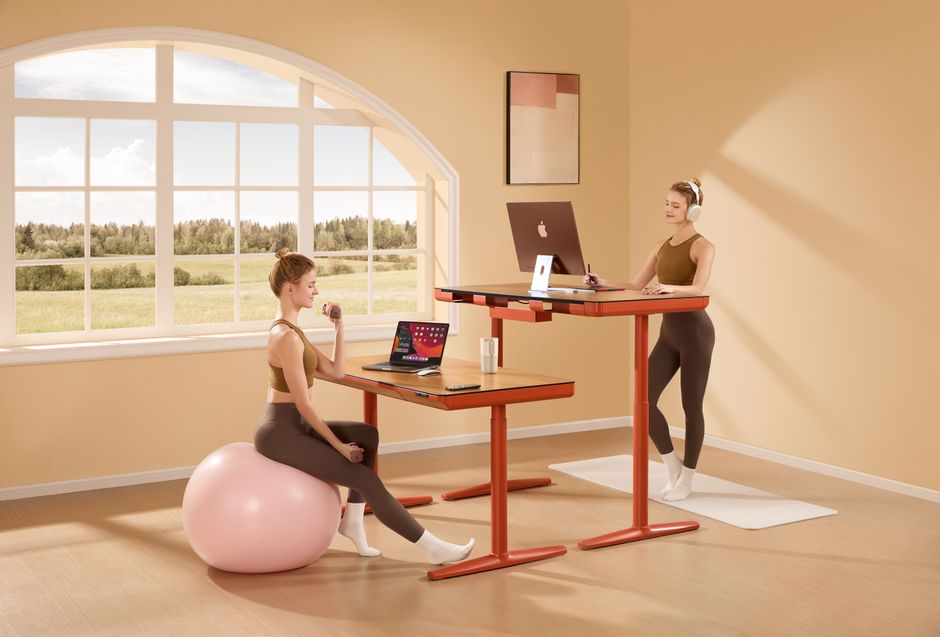
Photo by Höhenverstellbar Tischgestell Maidesite on Pexels
The most common standing desk mistake is a desk that is too high. Stand relaxed with your shoulders down and arms at your sides, then bend your elbows to about 90 degrees. Your keyboard should sit at that height, with wrists straight.
Save your sitting and standing heights as presets if your desk has memory buttons. If you have to fiddle with the height every time, you will stop switching.
Monitor position
When you stand, your eyes rise but the monitor often does not move enough with the desk if it sits on a separate surface. Keep the top of the screen at or slightly below eye level and about an arm's length away.
A monitor arm makes it easy to fine-tune height and distance for both positions. For laptops, use a stand plus an external keyboard so you are not hunching over the screen.
- ✓Top of screen at or just below eye level
- ✓About an arm's length from your eyes
- ✓Tilt the screen slightly back
- ✓Keyboard and mouse at elbow height
- ✓Laptop on a stand with external keyboard
How long should you stand?
Photo by Mike van Schoonderwalt on Pexels
Standing all day is not the goal. Long periods of standing can be tiring too. What helps is changing position regularly: sit for a while, stand for a while, and move in between.
Start with short standing blocks, such as standing for calls or the first part of each hour, and adjust based on how your body feels.
Accessories that make standing comfortable
A few inexpensive extras make a big difference.
- ✓Anti-fatigue mat to reduce pressure on feet and legs
- ✓Supportive shoes rather than bare feet on a hard floor
- ✓Cable management tray so cables do not snag when the desk moves
- ✓Monitor arm for quick height adjustments
- ✓A footrest or small step to shift weight while standing
Mistakes to avoid

Photo by Ann H on Pexels
Leaning on one hip, locking your knees, and raising the desk so high your shoulders creep up are the classic problems. So is placing the monitor too low when standing, which pulls your head forward.
Check your posture in a mirror or a quick photo once after setup. It is the fastest way to spot problems.
Make switching a habit
Tie standing to routines: stand for every video call, after lunch, or when you start a new task. Some desks and apps offer reminders. The best setup is the one you actually use, so keep switching easy and quick.
Your Questions Answered
How high should a standing desk be?
High enough that your elbows bend at about 90 degrees with relaxed shoulders. This depends on your height, so adjust it yourself rather than using a chart.
How many hours a day should I stand at a standing desk?
There is no single number. Alternate between sitting and standing throughout the day and avoid long static periods in either position.
Do I need an anti-fatigue mat?
It is one of the most useful accessories if you stand for more than short periods, especially on hard floors.
Where to Buy
Advertisement
Sponsored: today's featured offer →Advertisement